D2R Mobile on Android: Install Guide, Requirements & Performance
Quick Answer
- The headline
- Since v2.0 (October 2026) D2R Mobile runs on ARM64 Android phones — the same native execution as iPhone, with graphics on Vulkan instead of Metal.
- Requirements
- ARM64 processor, Android 12 (API 31) or later, and a GPU with Vulkan 1.1. That is the whole floor.
- How it installs
- Download the APK (no game content), generate an import pack from your own game files on a computer, copy it to the phone, import in the app. No root, no adb.
Android Finally Happened
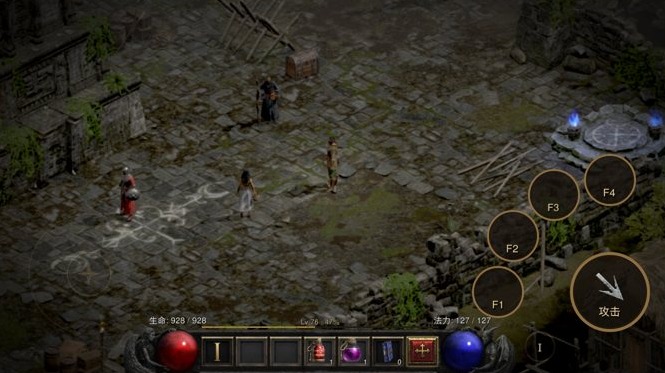
For its first week, D2R Mobile was an Apple-only story. That story ended with v2.0 (October 2026): a community port brings the same game program to ARM64 Android phones — executing natively, exactly as on iPhone, with the graphics layer reimplemented on Vulkan instead of Metal. The Apple and Android versions share the same host code, so both platforms move forward together.
This is the port's architecture promise landing on the other half of the phone market: Android phones use the same ARM64 processors as the Switch, so the game's real program runs directly — no emulator, no CPU translation. If you have been reading this site from an Android phone and feeling left out, this page is yours.
Requirements
| Item | Requirement |
|---|---|
| Processor | ARM64 (any modern 64-bit Android phone) |
| Android version | Android 12 (API 31) or later |
| GPU | Vulkan 1.1 support — recent Adreno / Mali / Xclipse chips qualify, but check your model |
| Storage | Your game resources (~5.6 GB) plus the import pack |
The project's default 3D render scale on Android is capped at 0.85 and lowered dynamically when frames drop — the port prioritizes steady frame times over pixel maximums.
Measured on Real Phones
From the v2.0 release notes — the port's authors published their own measurements:
| Phone | Result |
|---|---|
| Redmi K50 Ultra (Snapdragon 8+ Gen 1, Adreno 730, Android 15) | Median 60 fps in the camp, the Den of Evil fight and the Cow Level fight; GPU about 14–15 ms a frame |
| OnePlus 13 (Adreno 830) | Playable; one specific light effect occasionally flashes small black squares for an instant (under investigation) |
| vivo X200 Ultra | Played by the port's team |
Translation: a two-generation-old flagship already holds 60 fps in the fights that matter. On a newer chip, expect the same or better.
Install in Four Steps
The Android route skips the iOS signing circus entirely, but keeps one peculiarity: the APK ships without game content, so you build an import pack from your own files on a computer.
Install the APK
Download D2RMobile-android.apk from the project's Releases page and install it. It contains no game content — several of its data tables are read at run time from the pack you make next. Allow installs from your browser or file manager when prompted.
Make the Import Pack (on a computer)
With your own game files on a PC (the same Switch files as the Apple route — see preparing game files), run:
python3 dm/tools/d2rm_android.py <Update directory> <output directory>This rewrites the game program for Android, translates every shader into a Vulkan bundle, and packs the touch overlay and data tables into an android folder. The project reports the shader export is byte-for-byte identical to the builds its authors tested with.
Copy to the Phone
Copy the generated android folder together with your game resources (the data folder) to:
Download/S2X/D2R Mobile/No adb, no build tools on the phone — a plain file transfer.
Open and Import
Launch the app; it imports the pack with a progress screen. After that the game behaves like the iOS version: native execution, touch controls with the same layout, and the same endgame modes.
What's Different from the iOS Version
- Touch controls are drawn the same as iPhone — button sockets, silver skill silhouettes, the joystick; no virtual pad buttons covering open panels. The project compares the Android drawing with the iOS drawing pixel by pixel in CI.
- Three touch details are unfinished (documented by the project): the empty-skill-slot menu, the stat-point overlay, and the item image that follows your finger while dragging in a shop.
- Rendering defaults differ: an 0.85 render-scale cap with dynamic dropping, prioritizing stable frame times.
- Everything gameplay-side is identical — same game build (1.0.34.0), same modes (Greater Rift, Elysium, Boss Rush), same rules.
HarmonyOS: the Sibling Port
v2.0 also ships a HarmonyOS NEXT version (community port) on the same Vulkan engine. The catch is HarmonyOS's signing model: the store-free package is an unsigned shell (D2RMobile-harmony-shell-unsigned.hap) that you re-sign with your own debug certificate, then install with hdc install -r. You need a Huawei developer account (DevEco Studio generates the debug certificate and registers your device). The author verified the full chain — re-sign, install, import, into a game, save and exit — on a Mate 90 Pro Max, with three consecutive cold starts working.
Full steps live in the project's docs/HARMONYOS.md; the runtime pack is made with the same tool (d2rm_android.py --target ohos).
Android FAQ
Do I need root?
No. It is a normal APK install plus a file import. The port does not touch system partitions.
Can I use the same game files as the iPhone route?
Yes — the same Switch 1.0.34.0 files. The import pack is generated on your computer from those files; the phone only receives the result.
Do iOS and Android saves sync?
Not across platforms — each device keeps its own saves. Cloud sync exists only inside the Apple ecosystem (iCloud, paid signing); the project documents no Android cross-sync.
Platform support, requirements, measurements (Redmi K50 Ultra, OnePlus 13, vivo X200 Ultra) and the import-pack workflow from the d2r-mobile v2.0.0 release notes and current README (accessed 2026-10-23). Editorial framing and the "two-generation-old flagship" reading are ours.